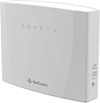
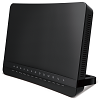
These guides will help you set up and use your TPG modem. You can find the name of your modem on its barcode sticker.

Don't have a TPG modem? Check out our BYO Modem Setup Guides.

TPG modems are not locked to TPG as a service provider and can be used with any compatible internet service.


Choose your modem

Picture Modem
Wi-Fi Max Modem Thumbnail
Wi-Fi Max Modem
Netcomm NL20 Modem
NetComm NL20 Modem
 Wi-Fi Max 5G Modem
Wi-Fi Max 5G Modem
VX420-G2V Modem
VX420-G2V Modem
VX420-G2H Modem
VX420-G2H Modem
VX220-G2V Modem
VX220-G2V Modem
TP-Link VR1600v Modem
Modem not listed here?
See Older modems.


Wi-Fi Max Modem

Choose which type of internet you have - this will be mentioned in emails from us about your order:


More guides


NetComm NL20 Modem


More guides


Wi-Fi Max 5G Modem


More guides


VX420-G2V Modem

Choose which type of internet you have - this will be mentioned in emails from us about your order:


More guides


VX420-G2H Modem

Choose which type of internet you have - this will be mentioned in emails from us about your order:


More guides


VX220-G2V Modem

Choose which type of internet you have - this will be mentioned in emails from us about your order:


More guides


We’re updating some of our mobile plans. If you have one of these plans, you may have received a notice about your plan changing.

If you have any questions about your plan change or wish to cancel, please call us on 13 22 58 and we’ll be happy to help.


Select one of the links below to jump to a query:


What does this mean for customers?

If your mobile service is affected by the change, you’ll get a notice from us explaining how your new mobile plan compares to your current plan.

  • The monthly price of your mobile plan may increase by $5.
  • You may begin receiving a discount for linking an eligible mobile plan with iiNet. Bundling discounts cannot be used with any other offer and will end if the internet service is unlinked or becomes inactive.
  • The monthly data included with your plan may increase.
  • Your mobile plan’s monthly included values for standard national and international calls, SMS and MMS may change.
  • If you have a complimentary International Call Pack with 60 minutes/mth to Std International numbers in 31 selected destinations, this will be removed.
  • If you have Complimentary International Call Pack with 60 minutes/mth to std international numbers in 221 destinations, this will remain included in your mobile plan.
  • Your plan may gain access to a 5G network when you use a 5G-approved phone within our 5G coverage area.
  • Your mobile data speed may be capped at 150Mbps or 250Mbps, depending on the mobile plan. Although your mobile speed will vary depending on your phone and coverage, streaming videos, using social media, and downloading files will still work just as smoothly as they do now. · The name of your mobile plan will be updated to the name of your new plan.
  • Your mobile number and monthly billing period for your mobile service will stay the same.

For more info about our Mobile plans, check out your plans Critical Information Summary.


When will my plan change?

Plan changes will happen automatically when your mobile plan next renews at least 30 days after your initial notice.

To see when your mobile plan next renews, log in to My Account and hit Mobile Usage. You’ll see a line that says, “Your quota resets in XX days”, followed by the date.

Note: It’s not possible to speed up these plan changes – please wait until they happen automatically.


Will this affect my Prepaid Balance?

Any Prepaid Balance you have will carry over to your new mobile plan. You may find you don’t need to top up your Prepaid Balance as often as before, depending on your new plan’s included value.


Can I change my mobile plan?

We’ve chosen your new plan based on the price and value of your old plan. If you’d prefer a different plan, you can switch to any of our current mobile plans in My Account.

Please note: If you cancel or change to a different mobile plan, any add-ons, discounts, or promotional discounts or benefits currently applied to your service may be forfeited.

Important: Our “Classic” plans are available by invitation only. If you change or cancel your Classic mobile plan, you cannot return to the Classic plan in the future.


What happens if I cancel my plan?

You won’t be charged a cancellation fee.

To keep your mobile number, you’ll need to transfer it to another provider before cancelling with us.


What are my options if I’m experiencing financial hardship?

We know that life can take unexpected turns, so if you’re experiencing financial hardship, we’re here to help. See our Financial Hardship Policy to find out more about your options or you can contact us on 1300 056 356 (8AM-8PM AET Mon-Fri) or via web form.


For full Terms & Conditions, see our Mobile Service Description at: https://www.tpg.com.au/terms_conditions.

How can we help?

All fields are mandatory.

A valid email is required, e.g. yourname@gmail.com

We’ll respond to your enquiry within 2 business days.

For details on how we resolve customer issues, visit our  Complaints Handling Process.

If the matter is urgent, or you’d prefer to talk with us, call our Customer Care on 13 14 23 (8am - 10pm AET)

By ticking this box I declare that the information provided is true and accurate at the time of completion. I also acknowledge that the information provided will be used and stored in accordance with the Australian Privacy Act and TPG’s Privacy Policy available at https://www.tpg.com.au/about-us/legal/privacy


Our team will be in touch with you over email within the next 2 business days.

From 1 July 2026, sender IDs must be registered 

A sender ID is the branded name shown at the top of a text message thread. For example, ‘AusPost’, ‘myGov’ or ‘TPG’. 

From 1 July 2026, businesses and organisations sending text messages using their name will be required to register their sender ID. 

As scammers often impersonate trusted brands, scam messages can appear in the same message thread as real messages. To help you understand which messages are legitimate, the SMS Sender ID Register has been established and is managed by the Australian Communications and Media Authority (ACMA).

Messages from unregistered sender IDs will appear on your phone as ‘Unverified’ and will be grouped together in a single message thread. Messages from registered businesses will continue to appear as normal. 

You should be cautious of unexpected or suspicious text messages that are ‘Unverified’. 

To find out more, head to the ACMA’s SMS Sender ID Register page. If you need to speak with us, call 13 14 23.


Frequently asked questions 

What’s changing from 1 July 2026? 

All companies and organisations using sender IDs need to register their sender IDs with the ACMA. 

Text messages from registered sender IDs will show the business or organisation’s name.  

Text messages from unregistered sender IDs will appear as ‘Unverified’, and will be grouped together in a single thread with other ‘Unverified’ messages.


Why is sender ID changing? 

Scammers often pretend to be well‑known brands or government agencies by faking sender IDs. These scam messages can appear in the same message thread as genuine messages, which can make them harder to spot.

The SMS Sender ID Register helps prevent this by making sure sender names are verified before they’re used. 


What do I need to do if I use sender IDs? 

If your business or organisation sends SMS or MMS messages using a sender ID, you’ll need to register that sender ID from 1 July 2026. 

If your sender ID isn’t registered, messages will appear as ‘Unverified’. 

To register, head to the ACMA’s Sender ID Register. 

Registration is handled through participating telecommunications providers. The ACMA manages the SMS Sender ID Register and publishes the list of participating providers and full registration requirements on its website. 


What if I think I received a scam message? 

Scammers use different tactics to pretend to be real businesses and try to get access to your personal information. These messages can sometimes be hard to spot. 

If you think you’ve received a scam message, report it to ScamWatch. 

To learn more about how we can help protect you from scams, visit our scam awareness page. 


Where can I see more information? 

For more information, visit the ACMA’s SMS Sender ID Register page. 

Submitted by adrian.chan@st… on Fri, 05/01/2026 - 01:04

testd

TPG relies on nbn®’s infrastructure to deliver our nbn services. On occasion, this infrastructure may be affected by unplanned outages or maintenance which can subsequently affect the nbn service we deliver to you.

You can check your address for an outage on the nbn® website by following these steps:
 

  1. Visit https://www.nbnco.com.au/support/network-status
     
  2. Enter your full address and hit Check address. 
     
  3. If your area is affected by an outage, we recommend that you check this page every few hours for updates. Two examples of an outage can be found below.

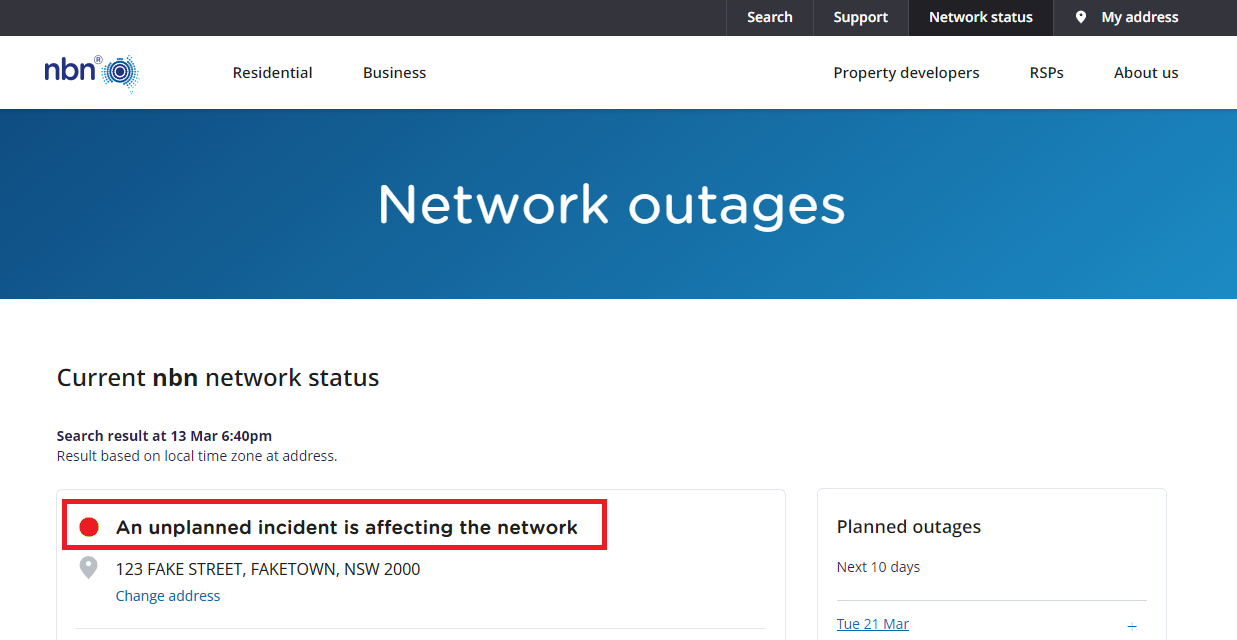
    Example: "An unplanned incident is affecting the network"
     
    NBN Outage Results saying "An unplanned incident is affecting the network"
     
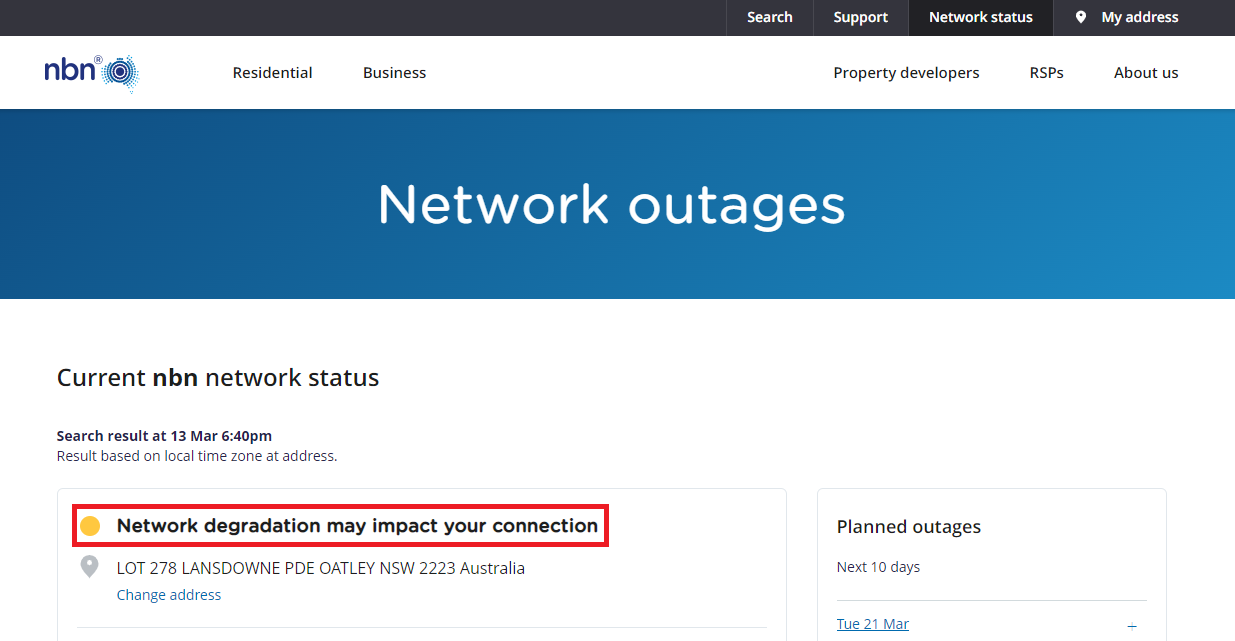
    Example: "Network degradation may impact your connection"
     
    NBN Outage Results saying "Network degradation may impact your connection"

Here’s how you can set up a compatible bring-your-own (BYO) modem for TPG Fibre to the Building (FTTB) on the Vision Network.

The Phone service and included calls are not available if you use a BYO modem.


Select one of the links below to jump to a query:


Modem compatibility

To work on TPG FTTB, your modem must:

  • support PPPoE connections, and;
  • depending on the connection type, support VDSL2 or Ethernet WAN.

If you’re getting the FTTB Max plan:

You’ll need a high-speed compatible modem.

Your choice of modem and how you set it up in your home could stop you from getting the maximum speed of your internet plan. If you choose to bring your own (BYO) modem instead of using a TPG-supplied modem, it must meet certain technical requirements for optimal performance on our Max plan.

Your modem must also support:

  • Gigabit Ethernet ports or better;
  • Wi-Fi 6 (802.11ax) or later

We also recommend:

  • Using a modem that features Band Steering so devices will automatically switch between 2.4GHz and 5GHz Wi Fi for the best performance and connection stability.
  • Connecting your devices via Ethernet Cable (CAT5e or higher) instead of Wi-Fi.
  • Getting a Mesh network for better Wi-Fi signal in a large property.

Not sure what your BYO modem can do? Check its barcode sticker for the make and model, then search for its tech specs online. You should find this info on the seller or manufacturer’s website. 

If your current modem doesn’t meet these requirements, you may not experience the full speed of your plan.

Your actual speeds can vary depending on several factors, including your internet plan, your modem's capability, and overall internet traffic. Your internet plan’s Typical Evening Speed will give you a realistic estimate of the speeds you'll experience. 

Some TPG Fibre to the Building (FTTB) services need a Network Termination Unit (NTU). If you need one, Vision Networks will install it for you during setup. Whether you need an NTU depends on the type of technology installed in your building.


General TPG FTTB setup guide for modems with an NTU

All modems are different. If this advice doesn’t work for your modem, check the manufacturer’s website for a guide on how to plug in and enter the TPG settings.
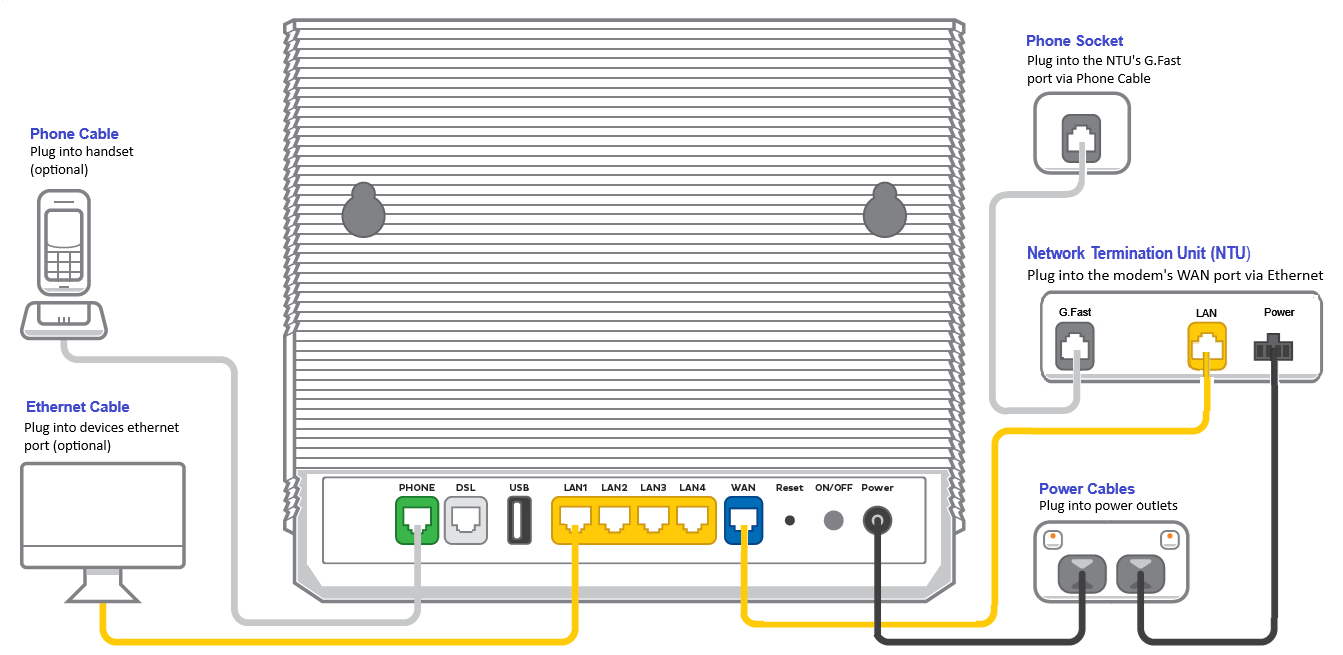

  1. Find your phone wall socket – you may already have a modem plugged in from your last internet service. Unplug any old modem from the phone wall socket and power outlet.
  2. Use a phone cable to connect your NTU's LINE + POWER or G.Fast port to your phone wall socket.

    Older NTUs may have an UPLINK port instead. Learn more.
  3. If your NTU has a G.Fast port: Use an Ethernet cable to connect your modem’s WAN port to your NTU's LAN 1 port.

    Older NTUs may have a LAN port instead. Learn more.
  4. If your NTU doesn't have a G.Fast port: Use a phone cable to connect your modem’s DSL port to your NTU's LINE port.

    Older NTUs may have a MODEM port instead. Learn more.
  5. Use the power cable to connect your modem's Power port to a power outlet, then turn it on.

    If your modem has a power button or switch, turn it on.
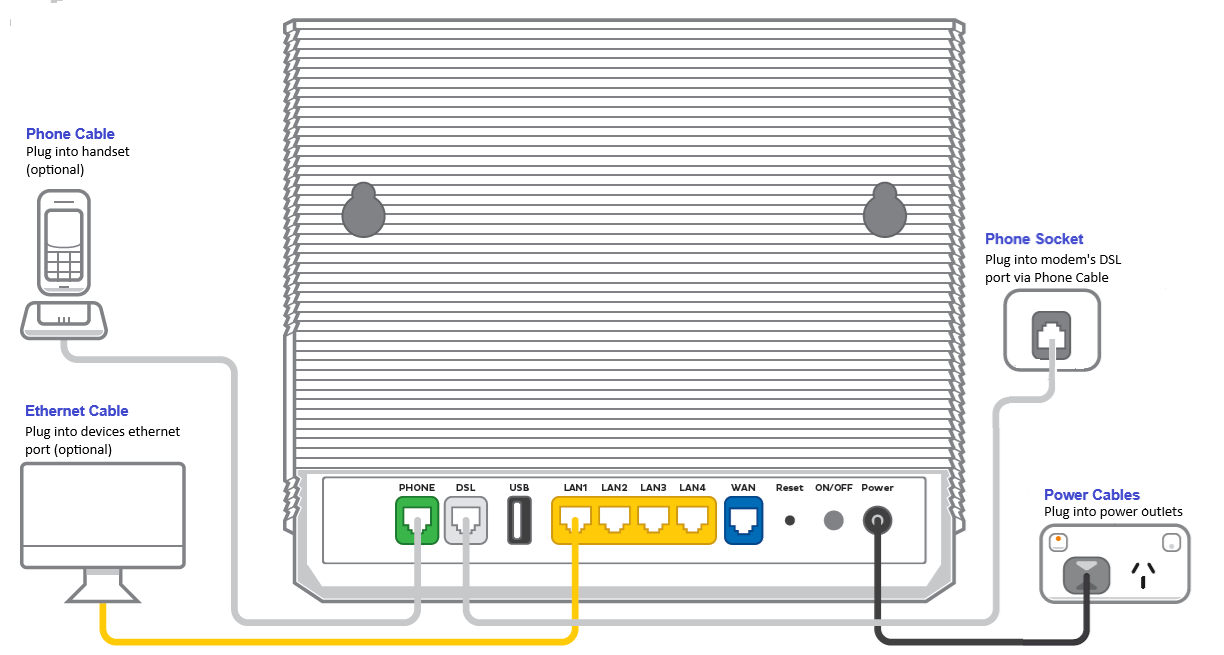
    VX420-G2V TPG Fibre with NTU plugin - from left to right, VX420-G2V ports are Phone, DSL, USB, LAN1, LAN2, LAN3, LAN4, WAN, Reset button, ON/OFF button, Power.
  6. Connect a device to your modem. You can use an Ethernet cable to connect a device to one of the LAN or Ethernet ports or connect via Wi-Fi.

    The default Wi-Fi name (SSID) and password can be found on your modem’s barcode sticker.
    TP-Link VX420-G2v Modem Barcode Sticker - Wi-Fi Name and Password
  7. On your connected device, open your web browser and go to your modem’s gateway address (e.g. http://192.168.1.1). The gateway address and login details can be found on the barcode sticker.

    Modems may have a login username and password, or just a password.
    TP-Link VX420-G2v Modem Barcode Sticker - Modem Login and Password
  8. Make sure your modem has the following settings. If you’re not sure how to do this, check the manufacturer’s website for a guide.

    If your NTU has a G.Fast port: 
    Mode/Modulation: WAN
    Connection Type: PPPoE
    Username: username@tpg.com.au
    Password: TPG Password
    If you forgot your password, you can reset it.
    DNS: Obtain automatically

    If your NTU doesn't have a G.Fast port: 
    Mode/Modulation: VDSL2
    Connection Type: PPPoE
    Username: username@tpg.com.au
    If you forgot your password, you can reset it.
    VDSL Profile: 17a Multi Mode
    VLAN ID: 2
    VLAN Priority: 0 or disabled
    G.INP: On or Enabled
    G.Vector: On or Enabled
    DNS: Obtain automatically
     
  9. Save your settings and wait 5-10 minutes for your modem to connect.
  10. You should now be online. If you can’t view a website or notice a red or unlit Internet light on your modem, call us on 13 14 23 for help.

    We’re fully trained on TPG supplied modems, but please note that there may be limited support for your BYO modem.


General TPG FTTB setup guide for modems only

All modems are different. If this advice doesn’t work for your modem, check the manufacturer’s website for a guide on how to plug in and enter the TPG settings.

  1. Find your phone wall socket – you may already have a modem plugged in from your last internet service. Unplug any old modem from the phone wall socket and power outlet.
  2. Use a phone cable to connect your modem’s DSL port to your phone wall socket.
  3. Use the power cable to connect your modem's Power port to a power outlet, then turn it on.

    If your modem has a power button or switch, turn it on.
    VX420-G2V TPG Fibre plugin - from left to right, ports are Phone, DSL, USB, LAN1, LAN2, LAN3, LAN4, WAN, Reset button, ON/OFF button, Power.
  4. Connect a device to your modem. You can use an Ethernet cable to connect a device to one of the LAN or Ethernet ports or connect via Wi-Fi.

    The default Wi-Fi name (SSID) and password can be found on your modem’s barcode sticker.
    TP-Link VX420-G2v Modem Barcode Sticker - Wi-Fi Name and Password
  5. On your connected device, open your web browser and go to your modem’s gateway address (e.g. http://192.168.1.1). The gateway address and login details can be found on the barcode sticker.

    Modems may have a login username and password, or just a password.
    TP-Link VX420-G2v Modem Barcode Sticker - Modem Login and Password
  6. Make sure your modem has the following settings. If you’re not sure how to do this, check the manufacturer’s website for a guide.

    Mode/Modulation: VDSL2
    Connection Type: PPPoE
    Username: username@tpg.com.au
    If you forgot your password, you can reset it.
    VDSL Profile: 17a Multi Mode
    VLAN ID: 2
    VLAN Priority: 0 or disabled
    G.INP: On or Enabled
    G.Vector: On or Enabled
    DNS: Obtain automatically
  7. Save your settings and wait 5-10 minutes for your modem to connect.
  8. You should now be online. If you can’t view a website or notice a red or unlit Internet light on your modem, call us on 13 14 23 for help.

    We’re fully trained on TPG supplied modems, but please note that there may be limited support for your BYO modem.

Here's what the status lights mean on your NetComm NL20 modem.

 

NetComm NL20 LED - from left to right: Power, Internet, WiFi, WAN, 4G, DSL
Light States and meaning
Power Off = No power.
Red = Your modem is starting (normally takes 1-2 minutes).
Green = Your modem has power. 
Internet Off = Your modem is offline. There may be a problem with the modem settings or its username and password.
Green = Your modem is online. This light flashes if there's a problem with the modem settings or its username and password.
WiFi Off =  Wi-Fi is turned off.
Green = Wi-Fi is turned on. This light flashes when WPS mode is active.
WAN Off = Your modem doesn't have a WAN connection. 
Green = Your modem has a WAN connection.
4G Off = No 4G connection or 4G is connected but not in use
Red = Low 4G signal
Yellow = Medium 4G signal
Green = High 4G signal 
DSL Off = Your modem doesn't have a DSL connection. 
Green = Your modem has a DSL connection. This light flashes during initial connection.

This is the credit-related personal information management policy of TPG Telecom Limited ("TPG Telecom") and each of the brands and subsidiaries listed at the end of this policy, including but not limited to Vodafone, TPG, iiNet, AAPT, Lebara Mobile, Felix Mobile, Internode, and Kogan Mobile, (referred to as "TPG Telecom", "we", "us", or "our").


Select one of the links below to jump to a query:


How do we Conduct Credit Checks?

A credit check involves TPG Telecom disclosing personal information about you to a credit reporting agency or third-party information providers to obtain and use credit and other reports and information about you to assess your creditworthiness and application for TPG Telecom products and services. TPG Telecom's request for a credit check may be recorded by the credit reporting agency to create or maintain a credit information file about you, which may affect your credit score or credit rating.


TPG Telecom may also:

  • request a credit report from a credit reporting agency to assist in the collection of any overdue payments; and
  • disclose information to a credit reporting agency to list default payments.


Information that TPG Telecom may disclose to a credit reporting agency before, during and after you become a TPG Telecom customer, includes:

  • information in your application form and of your account;
  • that you have applied for credit with TPG Telecom; 
  • that TPG Telecom is a current credit provider to you;
  • payments that are overdue and are in collections;
  • any cheque of yours for $100 or more which has been dishonoured more than once;
  • any serious credit infringement committed by you;
  • advice that payments are no longer overdue.


TPG Telecom may also disclose certain information about you and any debt you have with TPG Telecom to a debt collection agency or any potential assignee.

When TPG Telecom conducts any credit check or discloses your personal information for credit purposes, it is bound by the Privacy and Telecommunications Acts.


No Consent Required 

In accordance with the Privacy (Credit Reporting) Code 2024, your consent is not required for us to disclose your personal information to a credit reporting agency or third-party information provider. 


Why do we collect, hold, use or disclose credit information or credit eligibility information?

We may collect, hold, use and disclose credit information and credit eligibility information about you for the following purposes:

  • assessing your application for a postpaid service;
  • collecting payments that are overdue;
  • a commercial credit related purpose;
  • our internal management purposes that are directly related to the provision or management of consumer credit or commercial credit; and 
  • assisting you to avoid defaulting on your obligations under your agreement(s) with us.


Impact to your credit score 

A record of the credit check may be used and, as relevant, disclosed for the purposes of the credit reporting body or provider assessing your credit worthiness, including calculation of a credit score or credit rating.  


What kinds of credit information do we collect or hold?

Generally, we may collect and hold credit information about you which may include:

  • your name, date of birth, current and previous residential address, employment status, occupation, the name of your current or last known employer, employer’s phone number, and ID documentation, such as your driver’s licence number, passport number or Medicare number (or other government-issued identification);
  • the name of any entities which provide consumer credit to you, whether those entities hold an Australian credit license, the type of consumer credit those entities provide to you, the date on which the consumer credit is entered into and the terms and conditions relating to repayment of the consumer credit (or other terms and conditions relating to the consumer credit prescribed by regulations made under the Privacy Act), the maximum amount of credit available and the date any consumer credit is terminated or otherwise ceases to be in force;
  • information as to whether any other credit provider, mortgage insurer or trade insurer has requested certain information about you from a credit reporting body, and the type of credit and amount of credit sought in connection with the request;
  • the type of credit and the amount of credit sought in an application you have made to a credit provider;
  • subject to the relevant credit provider having given you notice required under the Privacy Act, information about a payment of an amount equal to or greater than $150 (or a higher amount prescribed by regulations made under the Privacy Act) that you are at least 60 days overdue in making in relation to consumer credit, and information about when such an overdue payment has been paid;
  • information as to any variation of the terms and conditions of consumer credit provided to you, or as to whether you have been provided with new consumer credit, because of a payment being so overdue;
  • information about a judgement of an Australian court that is made, or given, against you in proceedings (other than criminal proceedings) and that relates to any credit that has been provided to, or applied for by, you;
  • information about you that is entered or recorded in the National Personal Insolvency Index and that relates to:
  • a bankruptcy of you;
  • a debt agreement proposal given by you;
  • a debt agreement made by you;
  • a personal insolvency agreement executed by you;
  • a direction given, or an order made, under section 50 of the Bankruptcy Act that relates to your property;
  • an authority signed under section 188 of the Bankruptcy Act that relates to your property;
  • any other publicly available information that relates to your activities in Australia or the external Territories and your credit worthiness; and
  • the opinion of a credit provider that you have committed, in circumstances specified by the provider, a serious credit infringement in relation to consumer credit provided by the provider to you.


How do we obtain credit information?

We may obtain credit information in a number of ways, including:

  • when you complete a TPG Telecom account application, service enquiry form, or similar;
  • from other companies in the TPG Telecom group;
  • from third party companies like credit reporting bodies, other credit providers, law enforcement agencies and other government entities;
  • from publicly available sources of information;
  • during recordings of calls made when you contact TPG Telecom; and 
  • we may also collect credit information by other means and will take all reasonable steps to inform you if and when we do.


How do we hold credit information?

We hold that information in an encrypted electronic database located in Australia.


What kinds of credit eligibility information do we hold?

We may hold credit eligibility information about you, such as:

  • any of the types of credit information listed above which was disclosed to us by a credit reporting body under the Privacy Act;
  • any personal information (other than sensitive information (as defined in the Privacy Act)) about you that is derived by a credit reporting body from credit information about you that is held by the body that has any bearing on your credit worthiness and that is used or could be used in establishing your eligibility for consumer credit; and
  • information we derive from that credit reporting information (as described below).


What kinds of information do we derive from credit reporting information?

We derive information such as your credit score from the credit reporting information disclosed to us by a credit reporting body.


On what basis do we make a decision to decline/limit your application for services?

Our decision to either decline or limit your application for services may be wholly or partly based on the credit information or credit eligibility information that we receive from the credit reporting bodies that we use.


Contact details for Credit Reporting Bodies


To which credit reporting bodies are we likely to disclose credit-related personal information?

The credit reporting bodies to which TPG Telecom is likely to disclose that information are: Illion and Equifax. 

Those credit reporting bodies may include the information we disclose in reports provided to credit providers to assist them to assess your credit worthiness, including the calculation of your credit score and credit rating. If you fail to meet your payment obligations in relation to consumer credit, or commit a serious credit infringement, we may be entitled to disclose this to those credit reporting bodies.


How can you access your credit information or credit eligibility information?

You can request a copy of your credit information or credit eligibility information from the relevant credit reporting body. 

Contact details for the credit reporting bodies that we use are:

Illion 1300 734 806 (personal)
13 23 33 (business)
8.30am – 5.30pm AEST (Monday – Friday)
https://www.illion.com.au/

Equifax 138 332 (personal)
1300 921 621 (business)
8.30am – 5.00pm AEST (Monday – Friday)
https://www.equifax.com.au/personal/


Can you request a credit reporting body not to use or disclose credit reporting information?

You may request a credit reporting body:

  • not to use credit reporting information they hold about you for the purposes of pre-screening of direct marketing by a credit provider; and
  • not to use or disclose credit reporting information about you, if you believe on reasonable grounds that you have been, or are likely to be, a victim of fraud.


How accurate is the credit information or credit eligibility information we hold? If it’s incorrect, can you have it corrected?

We take reasonable measures to ensure that the credit information and credit eligibility information we hold is accurate, up-to-date and complete.

If you think that the credit information or credit eligibility information we hold about you is incorrect, you may seek to request a copy of the information and have it corrected by completing our credit information request form and emailing the completed form to Credit@tpgtelecom.com.au. 

Please note that the above process is not for the purpose of requesting a review of our decision to either decline or limit your application for services.


How can you complain if you believe we have failed to comply with the Privacy Act or the Credit Reporting Code?

If you believe that we have failed to comply with Division 3 of Part IIIA of the Privacy Act or the Credit Reporting Code, you may make a complaint by emailing Credit@tpgtelecom.com.au and specifying the nature of your complaint. If your complaint relates to a breach of section 21T or 21V of the Privacy Act, you may complain to the Australian Privacy Commissioner.


If you make such a complaint to us, we will:

  • give you a written acknowledgement of your complaint within 7 days after you made the complaint; and
  • investigate the complaint. 


We will consult with any credit reporting body or credit provider that we consider necessary to investigate the complaint.  After investigating the complaint, we will give you a written notice about our decision. If we are unable to give that notice within 30 days after you made the complaint, we will inform you of this within 30 days after you made the complaint and notify you of the reason for the delay, the expected timeframe to resolve the complaint and seek your agreement to us giving that notice at a later date.


To whom may we disclose credit information or credit eligibility information?

We may disclose credit information or credit eligibility information to entities both within and outside Australia (including entities without an Australian link within the meaning of the Privacy Act). Entities outside of Australia to whom we may disclose credit information or credit eligibility information are likely to be located in the Republic of India, the Philippines or the Republic of Fiji.


How can you obtain this policy, or a credit reporting body’s policy about its management of credit-related personal information?

You may obtain free of charge:

  • A copy of this policy. You can reach out to our customer care team on 1300 993 011 for a hardcopy version of this policy:
  • Illion’s policy about the management of credit-related personal information.
  • Equifax's policy about the management of credit-related personal information.


This Policy applies to the TPG Telecom Group, including but not limited to the following entities:

  • TPG Telecom Limited (formerly Vodafone Hutchison Australia Pty Limited) ABN 76 096 304 620.
  • Vodafone Australia Pty Limited ABN 86 056 161 043
  • Vodafone Pty Limited ABN 76 062 954 554
  • Vodafone Network Pty Limited ABN 31 081 918 461
  • iiNet Limited ABN 48 068 628 937
  • Chime Communications Pty Ltd ABN 90 073 119 285
  • Agile Pty Ltd ABN 36 080 855 321
  • TransACT Victoria Communications Pty Ltd ACN 063 024 475
  • Adam Internet Pty Ltd ABN 22 055 495 853
  • TransACT Capital Communications Pty Limited ABN 23 093 966 888
  • Westnet Pty Ltd ABN 50 086 416 908
  • AAPT Limited ACN 052 082 416
  • Internode Pty Ltd ABN 82 052 008 581
  • TPG Corporation Limited ABN 46 093 058 069
  • TPG Internet Pty Ltd ABN 15 068 383 737
  • TPG Network Pty Ltd ABN 85 003 064 328
  • Chariot Pty Ltd ABN 31 088 377 860
  • SPTCom Pty Ltd ABN 75 111 578 897
  • Soul Communications ABN 99 085 089 970
  • PowerTel Limited ACN 001 760 103
  • Request Broadband Pty Ltd ABN 89 091 530 586
  • Connect Internet Solutions Pty Ltd ABN 61 054 112 435
  • Soul Pattison Telecommunications Pty Ltd ABN 79 001 726 192
  • Soul Communications Pty Ltd ABN 99 085 089 970


Registered address: Level 27, Tower 2, International Towers Sydney, 200 Barangaroo Avenue, Barangaroo NSW 2000

Version: 2.0

The current policy came into effect on 09/09/2025 and may be updated from time to time by posting a new version on our website.